Social media for photographers
Sneak peeks, behind-the-scenes setups and posts that answer booking questions.
See my postsFree to try. No credit card.
 Willow Creek PortraitsJust now · Example
The most common question I get before every family session. Pick two or three colors that go together, skip big logos, and add one texture like knit or linen. Save this for your next session.
 Like Comment Share
 harborlightphotocoExample
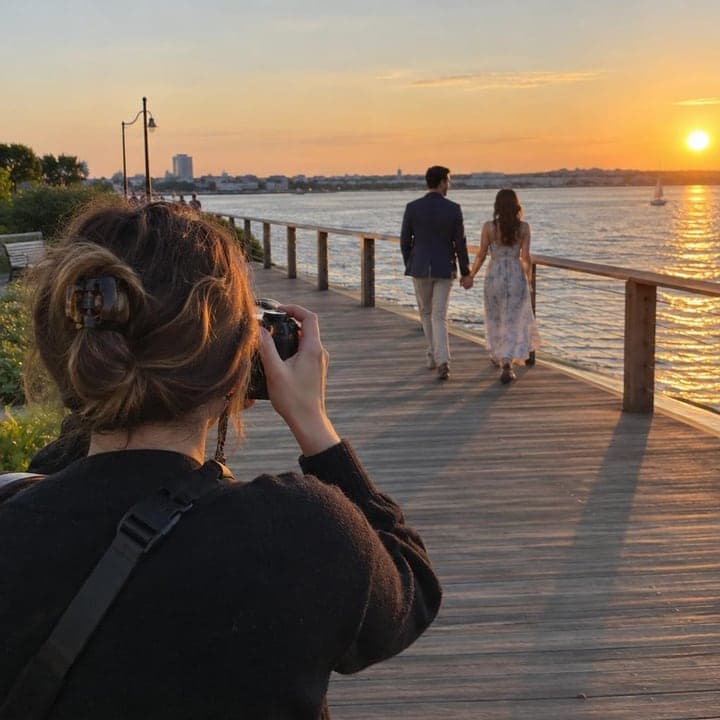
harborlightphotoco Here's what an engagement session looks like from my side of the camera. Lots of walking, a little laughing, and me finding the light. Booking couples for spring now 📸
Made-up businesses. Posts written and designed by Bold Beluga.

Posts that work for photographers
- Next-day sneak peek
- Behind the scenes setup
- Answer a booking question
- Location spotlight
- Before and after edit
- Mini session announcement
See posts for your business
- Reads your website and learns how you talk
- Writes and designs 50 posts a month for Instagram and Facebook
- You approve each post, or let autopilot publish them
Paste your website. Free to try, no credit card needed.
The guide for photographersIdeas, rhythm and mistakes to skip · 3 min read
People hire a photographer after they've seen the work. Your website shows a polished portfolio, but your social feed is where a bride, a new mom or a small business owner checks whether you're still shooting, what your recent sessions look like and whether you seem easy to work with.
Social media also keeps you in mind between big moments. Families book once a year, couples book once, and businesses update headshots every few years. Steady posting means that when the time comes, or a friend asks for a name, yours is the one they remember.
Clients book the photographer they feel they already know
Choosing a photographer is personal. People want to see that your style matches theirs and that you'll make them comfortable in front of the camera. Regular posts show your recent work, your editing look and how you run a session, so by the time someone messages you, they've mostly decided. Every client you tag also shows your work to their friends and family, who are often planning the same kind of session.
Six ideas that work for photographers
1. Next-day sneak peek
Post one or two favorite frames within a day or two of a session and tag the client. A single backlit shot from a Saturday family session often gets shared by grandparents, and that share reaches the exact people who book.
2. Behind the scenes setup
Show the pulled-back view: the reflector, the step stool, you lying in the grass for the angle. A short clip of how you set up a newborn session puts nervous parents at ease.
3. Answer a booking question
Turn the questions you get by message into posts. A carousel on what to wear for family photos, with color palettes that work together, is something people save and send to their spouse.
4. Location spotlight
Feature a local spot you love shooting and explain why: the light at a certain park or the brick wall downtown. Couples planning engagement photos often start by picking a place.
5. Before and after edit
Show a straight-from-camera frame next to your final edit. It explains your style and why your gallery takes a couple of weeks, without you having to say it.
6. Mini session announcement
Post dates, location, price and what's included for a short-format day, with a sample image from a past one. Give a clear way to book and a reminder post as spots fill.
A rhythm you can keep
Two or three posts a week is plenty for a working photographer, and it's better to keep that pace than to post daily during slow months and vanish when you're busy shooting. Make one post a week a client sneak peek, since that's your strongest work and gets shared. Fill the rest with a mix of behind-the-scenes, a helpful tip like what to wear or how to prep kids, and occasional booking news such as open dates or mini sessions. Short stories during a session or while culling take seconds and keep you visible between posts. Batch your captions on an editing day so posting doesn't eat into shoot days.
Mistakes to skip
Posting without the client's okay
Not every client wants their photos public, especially with kids or boudoir work. Put social sharing in your contract and ask before tagging anyone.
Only posting finished portfolio shots
A feed of perfect images looks like every other photographer's. People book you because of how you work with them, so show the process and your personality too.
Never saying how to book
Followers admire the work and then don't know the next step. Mention prices or starting points, how far out you book, and where to send an inquiry.